034 Motorsport - Audi SQ7 4M 4.0 TFSI ECU & TCU Tuning Bundle
034 Motorsport Australia - Audi SQ7 4M 4.0 TFSI ECU & TCU Tuning Bundle.
034Motorsport Dynamic+ ECU Tuning software for your Audi SQ7 4M fitted with the 4.0TT EA825 is simply incredble! Our ECU and TCU Tuning delivers strong and smooth acceleration with factory level refinement. Built for real world driving and not just peak numbers, the driving experience is powerful, smooth and amazingly refined. 034 software engineers develop using extensive testing and high-resolution data collection which ensures consistent and reliable performance in any condition.

034Motorsport Audi SQ7 Tuned figures:
Stock (Measured by 034): 518 HP / 770 Nm
Stage 1: 624 HP / 924 Nm (95 Octane) +106 BHP & +154 Nm
Stage 1: 669 HP / 985 Nm (98 Octane) +151 BHP & +215 Nm
Stage 1: 743 HP / 907 Nm (E60-E85 Octane) +225 BHP & +137 Nm
Stage 1: 748 HP / 1041 Nm (E40 Blend) +230 BHP & + 271 Nm

4M SQ7 ZF8 TCU Compatibility:
2022+ 4M.5 SQ7 model-year vehicles are equipped with TCU flashing protections that prevent OBD unlocking and tuning, known as the 401 bootloader. In order to unlock your TCU, select the Bootloader Unlock Harness (BLU) from accessories.
Add to cart: 034SPI Boot Loader Unlock (BLU) Harness for Audi (AL552/AL952) ZF8 Transmissions

Quality, reliability and drivability
Your SQ7 isn’t just something you take out on weekends. It’s the daily driver, the road trip car, the SUV that handles everything life throws at it, backed by decades of Audi performance engineering. 034Motorsport Dynamic+ software builds on that foundation the right way. More power without sacrificing the smoothness and drivability you expect every day.
Audi uses “Dynamic” for its performance factory modes. Dynamic+ picks up where Audi left off, providing transformative performance in a package as refined and reliable as if it came from the factory with it. For us, Dynamic+ isn’t just a name. It’s the approach to tuning that we’ve refined across dozens of Audi platforms for over 20 years.
Every calibration is built with Dynamic+ in mind, making real gains without compromising quality, reliability, drivability, or usability.

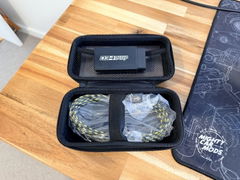
034SPI pairs with the Dynamic+ R4 Flashing Dongle via Bluetooth to deliver a full suite of tuning, monitoring, and diagnostic tools — no Windows PC, no cables, no shop visit needed.
Wireless ECU & TCU Flashing
Live Data Display
Mobile Datalogging
Fuel Map Switching
DTC / CEL Diagnostics
Enhanced Flash Safety
VariSpecMake It Yours

034Motorsport VariSpec is a feature customization suite within 034SPI, giving you direct control over market-first features and functionalities within your tunes. Instead of being locked into a single feature set, VariSpec lets you tailor key performance and drivability features to your hardware, driving style, and personal preferences.
With VariSpec on your EA825 4.0T, you can configure things like:
User can enable/disable crackle overrun/burbles present on throttle liftoff, and if enabled, select their desired crackle duration in 0.5-second intervals from a minimum of 1 second to a maximum of 2.5 seconds.
Exhaust Flap ControlUser can select how they would like the exhaust flaps to actuate, from stock, Dynamic+ optimized, Always Open in All Drive Modes, and disable flaps altogether to remove performance limitations if an aftermarket catback without flaps is installed, without the need of flap sensor cancellers.
Stock TCU Performance PatchAllows for tuned engine performance output safely on a stock/untuned transmission
Cylinder on Demand SelectorUsers can select whether they would like to enable or disable the OEM cylinder deactivation program for fuel savings
Auto Start/Stop SelectorUsers can choose whether the start/stop system functions like stock, or is off by default and can be re-enabled via the in-car button each key cycle.
Left-Foot BrakingAllows for the throttle to be applied while applying the brake, great for Brake Boosting or performance trail-braking
Vehicle Speed LimiterUser can Enable or Disable the factory Top Speed limiter. From subtle daily driving to aggressive performance, you can dial in your experience.

SQ7 4M ZF8 TCU Tuning
2022+ 4M.5 SQ7 model-year vehicles are equipped with TCU flashing protections that prevent OBD unlocking and tuning, known as the 401 bootloader. In order to unlock your TCU, select the Bootloader Unlock Harness (BLU) from accessories.
Add to cart: 034SPI Boot Loader Unlock (BLU) Harness for Audi (AL552/AL952) ZF8 Transmissions
8HP95 ZF8 TCU tuning for the 4M.5 SQ7 and 4M8 SQ8 features targeted, tailored calibrations designed to complement increased engine power. These refinements ensure smooth, refined power delivery while enhancing shift quality, drivability, and everyday usability. The result is a more responsive yet comfortable driving experience that seamlessly integrates added performance with OEM-like behavior.
Improved Torque Management
Torque calibration is specifically optimized for the EA825 4.0T and 8HP95 ZF8 transmission, ensuring the TCU remains fully aligned with increased output. This allows the drivetrain to handle higher torque levels with confidence while preserving the smooth, refined performance expected from the 4M.5 SQ7 and 4M8 SQ8 in all driving conditions.
Gear Display in All Driving Modes
The active gear is displayed across all drive modes, providing constant visibility and improved driver awareness. This added feedback enhances driver confidence and control, whether cruising or pushing the vehicle in more dynamic driving situations.
Kickdown Switch Disabled in Manual Mode
Kickdown is disabled in Manual mode, preventing unintended downshifts when pressing through the throttle detent. This ensures the 8HP95 ZF8 transmission holds the selected gear, giving the driver full control during spirited driving or when precise throttle modulation is required.
No Auto Upshift
Automatic upshifts at redline are disabled in Manual mode, allowing the 8HP95 ZF8 transmission to hold the selected gear until the driver initiates a shift. This delivers a more engaging and predictable driving experience, and is especially beneficial for performance driving scenarios such as canyon runs, track days, HDPE, and autocross.
ECU Tune Supporting Modification Requirements:
| STAGE | REQUIRED MODIFICATIONS | RECOMMENDED MODIFICATIONS |
|---|---|---|
| Stage 1 95/98 | No Hardware Required |
|
| Stage 1 E60-E85 | No Hardware Required |
|
| Stage 1 E40 | No Hardware Required |
|
Fitment
| Make | Model | Years | Chassis | Engine |
|---|---|---|---|---|
| Audi | SQ7 | 2020-2023* | 4M/4M.5 | 4.0 TFSI |
| Audi | SQ8 | 2020-2023* | 4M8 | 4.0 TFSI |
*Note: 2024 and later model year ECUs will be supported with future updates.
Buying Guide
If your vehicle is manufactured in 2020 and 2021 you only need to purchase the flash cable and you can tune the ECU and TCU. As such we recommend the ECU and TCU combination. If your vehicle is manufactured in 2022 and beyond you will need to purchase the TCU 401 unlock cable as well as the flash cable. You can also just purchase the stage 1 tune and flash cable and run a stand alone ECU tune.
How to use the end user flash cable & software
- Receive welcome email (after purchase) with 034 software account and user guide
- Plug into OBD2 port & take read of stock ECU / TCU
- Send 034 stock file details from software (very easy)
- Plug back into OB2 port & USB and flash tune your ECU / TCU
Once you have taken the stock read of the ECU you can always flash your car back to stock at any time. You can also flash between stages.
The reading / flashing and software process is not complicated. Everything is straight forward and anyone who has the computer skills to send an email can do this process.
Initial read time - 10 minutes
First flash time - 20 minutes
Flash back to stock - 10 minutes
Upgrading files (stage 1 to 2) - 5 minutes
Flashing between files and stages - 5 minutes
Download: 034 Motorsport Dynamic + user manual
What happens next?
- We will create a tuning order for you with head office
- We will post you the Dynamic+ tuning cable - Express post only
- Please wait and 034 tuning support will send you an account activation email. This contains instructions and links to download the tuning software.
- A user manual is available to download from every tuning product page
- You then proceed to take a read of your ECU/TCU and flash tune your vehicle
- 034 will provide direct support for you. You will be able to communicate with the software engineers
- Enjoy the transformation of your vehicle
Why purchase 034 Motorsport?
- Exceptional quality
- Passionate and devoted company
- Continual product development
- Excellent local and manufacturer support
- Extremely reasonable with pricing
- Huge selection of supporting products
- Superior software calibration
- Paypal, zip pay, afterpay, credit and debit
- Free express only shipping
- 30 day money back satisfaction guarantee
Q: What device can I use to flash tune my car?
- Android auto phone or tablet
- Apple phone, tablet or Apple Silicon-equipped laptops (M1, M2, M3).
- Simply navigate to Google Play or Apple App store and download "034SPI"
- To find the app simply search "034SPI"
Q: What happens after I order my tuning cable and software?
A: We will EXPRESS post the cable and start a tuning order for you.
- How long do I have to wait to receive my tuning download link and username?
- From the minute your order is processed on the VAGParts website, you can expect a 1-3 business day fulfillment time to receive your download links and username from the 034 Motorsport tuning team. Please be on the lookout for this email, which will come from the email address "tuning@034motorsport.com"
Q: What is in the introductory email?
A: This is an email from 034Motorsport which includes the username for your account, a link to download the flashing software and the Getting Started user manual.
Q: I haven't got my introductory email
A: You may have to wait 1-3 business days to receive this email from the 034Motorsport team. Please also check your spam, updates, and other email tabs for the email from 034Motorsport. If it still hasn't come after a couple of days please contact VAGPARTS. Please note weekends are not working days.
Q: What do I need to tune my vehicle with a laptop?
A: Windows 10/11 laptop, strong/stable internet connection, Dynamic+ flashing cable, a 20-amp battery supply charger/maintaner, and tuning account access.
- I have everything I need what do I do next?
- Please download the 034 flashing client if you haven't already, and review the Getting Started guide. You'll need to register your username on 034 Motorsport's server, by inputting your username/email address in the applicable field, and clicking the "Forgot/Reset Password" link. This will send an email to you that will allow you to set your own password, which you'll need to use to log into the flashing client software. Once you are logged into the flashing client, please click on the controller that you wish to program (either ECU - engine, or TCU - transmission) and proceed through the steps listed in the "Getting Started" guide to flash that controller. The files labeled "Stock" are completely OEM software calibrations, as you would have received from the factory, so please only flash these if you wish to go back to stock tuning.
- I received an error message stating that "No products are available for this controller", what do I do?
- If you receive the error message "No products are available for this controller", please email tuning@034motorsport.com directly, and someone from their tuning support team will advise you on the steps that they will take to get you access to the files that were purchased.
Q: How do i flash with my mobile?
A: Please visit the YouTube playlist for 3 help video's
Q: How hard is the flashing process?
A: This is NOT a difficult process. If you have the ability to open and email and send an email, this is the same level of computer literacy needed.
Q: How long does the flashing process take?
A: The total time to tune the car is around 30 mins. Flashing between files, upgrading and so on once you have done the first installation is a couple of minutes.
- I need some technical support. Who do I contact?
- Please email tuning@034motorsport.com and a dedicated tuning support representative will help address any concerns or questions you may have.
Q: My car already has a tune on it, how do I remove it?
A: You may need to flash your car back to stock. You can do this by flashing the car to stock using the 034Motorsport flashing portal.
Q: Do I have to flash my ECU and TCU?
A: Yes, these are separate control units and need to be individually flashed.
Q: What is 91 AKI and 93 AKI? RON to AKI?
A: 91AKI is 95 RON and 93 AKI is 98 RON. When flashing select the file appropriate to the fuel octane you are using.
Q: How long do I have to wait for my tuning introductory email?
A: 48 hours or 2 working days
Q: How long do I have for wait for my tuning files?
A: Please allow 72 hours or 3 working days for fulfilment
Q: What is the normal turn around for the entire process?
A: Please allow up to 4 working days
Mobile APP Tuning (034SPI)
Flash tune your vehicle with any mobile or tablet device of your choice!
What device can I use to flash tune my car?
- Android auto phone or tablet
- Apple phone, tablet or Apple Silicon-equipped laptops (M1, M2, M3).
- Simply navigate to Google Play or Apple App store and download "034SPI"
- To find the app simply search "034SPI"
How to flash?
How to Datalog?
How to change Octane files?
Flash tuning with a Windows laptop
Please visit the 034 Motorsport FLASH PORTAL
Getting Started
1. Download your "getting started" flashing user guide
2. Download the "Dynamic+ flash tuning" software
3. Register your user name and password (from tuning introductory email)
4. Sign in to the "Dynamic Flash" software
What's Next?
- Plug into your vehicles OBD II port with the 034 flash cable
- Open the 034 tuning software
- Identify your stock ECU and TCU software box code - upload this via the 034 software
- Select your ECU calibration and flash tune your ECU and then TCU
Times for Delivery
From website order to tune introductory email - 48 Hours
From uploaded stock files to order fulfilment - 72 Hours
Normal maximum total time - 4 Business days
What if a file isnt ready yet?
Please contact tuning@034motorsport.com to let them know that a file was not available for your vehicle. A new file will be created and uploaded to the server for you ready for flashing - usually within 72 hours or 3 working days.
First flash time - 20 minutes
Flash back to stock - 10 minutes
Upgrading files (stage 1 to 2) - 5 minutes
Please run through the user manual and install your ECU file and or TCU files and if for some reason you run into any unexpected issues please email tuning@034motorsport.com
Fuel Ratings
Please note American fuel types use a different fuel rating system AKI.
91 AKI = 95 RON
93 AKI = 98 RON
We recommend BP98 ONLY for 93 AKI files.